Corporate Accounts — Manage AP for Multiple Companies from One Account
Manage AP for Multiple Companies from One Account
EasyInvoiceManager Corporate Accounts allow a manager to oversee Accounts Payable for multiple companies from a single account.
Instead of creating separate logins and managing each company independently, a Corporate Manager can invite and manage multiple users and company accounts while maintaining the AP activity, invoices, approvers, vendors, and approval processes for each company separately.
This is especially useful for:
CPA and accounting firms managing AP for multiple clients
Businesses with multiple companies or subsidiaries
Corporate groups with multiple locations or entities
Shared-service accounting departments
Organizations providing AP services to multiple businesses
How Corporate Accounts Work
A Corporate Account provides a central management account above the individual company accounts.
The basic structure is:
Corporate Account → Manager → Companies → Users & Approvers
Each company continues to operate its own EasyInvoiceManager account, including its own:
Invoices
Vendors
Approvers
Approval policies
Classifications
Cost centers
Payment information
AP activity
Reports
The Corporate Manager can manage multiple companies without needing a separate management account for each one.
The Corporate Manager
The Corporate Manager is the primary administrator for the Corporate Account.
The Manager can:
Invite users
Manage company accounts
Assign users to companies
Monitor AP activity
Access authorized company accounts
Manage users and permissions
Review approval activity
Monitor invoices requiring attention
The Manager's access does not eliminate the company's own users or approvers. Each company can continue to control who is responsible for approving and managing its invoices.
Managing Multiple Companies
From the Corporate Account, the Manager can maintain a list of companies under management.
For example:
| Company | Pending Invoices | Pending Approvals | Status |
|---|---|---|---|
| ABC Plumbing Supply | 18 | 4 | Active |
| Desert HVAC Supply | 31 | 7 | Active |
| Valley Electrical Supply | 12 | 0 | Active |
| Smith Industrial Supply | 22 | 3 | Active |
This provides the Manager with a central view of the companies being managed.
Select a company to access its EasyInvoiceManager account and work with that company's AP process.
Each Company Maintains Its Own AP Process
Although companies are managed from the Corporate Account, each company remains separate.
For example, Company A may have:
Approval Policy
Up to $5,000 — Department Manager
$5,001–$25,000 — Controller
Over $25,000 — Owner
Company B can have completely different approval rules.
This allows the Corporate Manager to manage multiple companies without forcing every company to use the same AP structure.
Manage Users and Approvers
Corporate Accounts make it easier to manage the people responsible for AP across multiple companies.
Users can be assigned to the appropriate company and given access based on their role.
For example:
CPA Firm
Sarah — manages 8 clients
John — processes invoices for 5 clients
Mike — reviews AP for 3 clients
At the company level, the client can continue to maintain its own approvers.
This creates a separation between the people managing AP and the people approving company expenses.
Manage AP for Accounting Clients
Corporate Accounts are particularly useful for CPA and accounting firms.
A CPA firm can use EasyInvoiceManager to manage AP processes for multiple clients while allowing each client to maintain its own approval structure.
For example:
Accounting Firm
→ ABC Plumbing Supply
→ Desert HVAC Supply
→ Valley Electrical Supply
→ Smith Industrial Supply
The accounting firm's staff can process and monitor AP while the individual clients retain control over their invoice approvals.
This allows the accounting firm to provide AP services without requiring its staff to maintain a separate management process for every client.
Centralized AP Oversight
A Corporate Account provides a central point for managing multiple companies.
The Manager can monitor activity such as:
Invoices awaiting processing
Invoices awaiting approval
Approval activity
AP exceptions
Company activity
User activity
This makes it easier to identify which companies require attention without manually checking every account.
Company Separation
Each company maintains its own AP records.
Invoices, vendors, approval policies, users, and other company information remain associated with the appropriate company account.
This is important when managing multiple clients, subsidiaries, or separate business entities.
A Corporate Manager should only provide users with access to the companies they are authorized to manage.
Example: CPA Firm Managing Client AP
The CPA Model
A CPA firm manages AP for 10 clients.
Instead of maintaining 10 separate administrative processes, the firm uses one Corporate Account.
The Manager can:
Add each client company.
Invite the appropriate CPA staff. or Invite client Administrators
Assign staff to the companies they manage.
Access each authorized company account.
Process invoices.
Monitor pending approvals.
Review AP activity.
Return to the Corporate Account and manage another company.
The clients continue to approve their own invoices according to their individual approval policies.
Corporate Account vs. Individual Account
Individual Account
Designed for one company managing its own AP.
Corporate Account
Designed for an organization managing AP across multiple companies.
A Corporate Account provides an additional management layer while allowing each company to maintain its own AP environment.
Best Uses for Corporate Accounts
Corporate Accounts are ideal when one organization needs to manage AP for multiple businesses.
Common examples include:
CPA & Accounting Firms
Manage AP operations for multiple clients from one central account.
Holding Companies
Manage AP for multiple subsidiaries or operating companies.
Multi-Company Organizations
Maintain separate AP processes for different legal entities.
Shared Accounting Departments
Allow a centralized accounting team to manage AP for multiple companies.
AP Service Providers
Provide invoice processing and AP management services to multiple customers.
Recommended Corporate Account Structure
For organizations managing multiple companies, we recommend establishing a clear structure:
Corporate Manager
↓
Corporate Staff
↓
Company Accounts
↓
Company Users
↓
Company Approvers
This structure allows the Corporate Manager to maintain centralized oversight while keeping each company's AP process separate.
Getting Started
To use EasyInvoiceManager for multiple companies:
Create or access your Corporate Account.
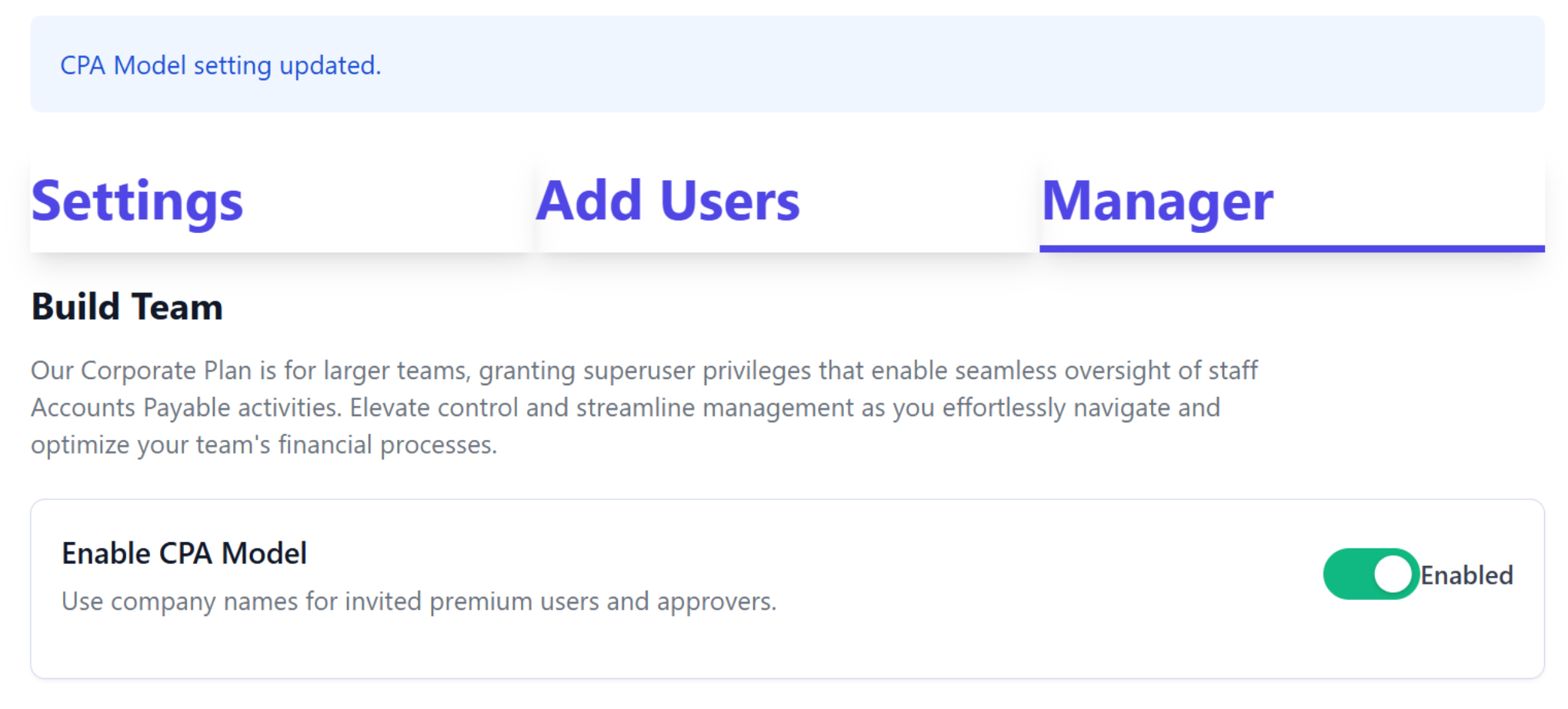
Go to switch and enable CPA model
Add or invite the companies you manage.
Invite Corporate Staff who need access.
Assign staff to the appropriate companies.
Configure each company's AP workflow.
Add the company's users and approvers.
Begin processing and managing invoices.
Once configured, the Corporate Manager can manage authorized companies from one central account.
One Account. Multiple Companies. One AP Management System.
EasyInvoiceManager Corporate Accounts make it easier to manage AP across multiple companies while allowing each company to maintain its own invoices, vendors, approval policies, users, and financial controls.
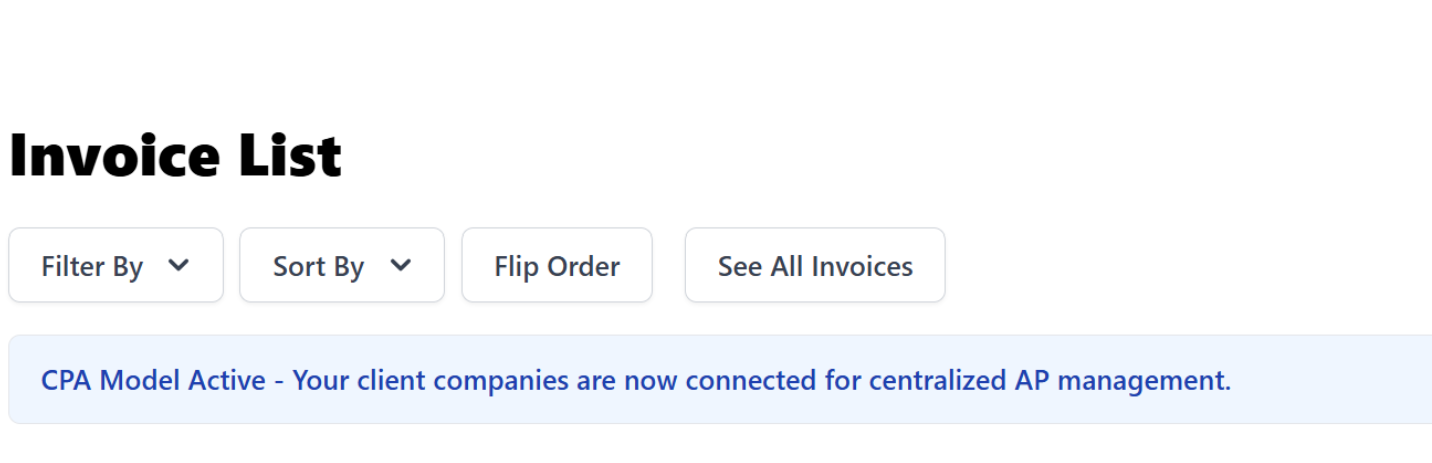
Enable CPA Model - Also note interface reminds you that this model is activated
Was this article helpful?
That’s Great!
Thank you for your feedback
Sorry! We couldn't be helpful
Thank you for your feedback
Feedback sent
We appreciate your effort and will try to fix the article